
Paramount+ Profanity Filter
Make Paramount+ Family-Friendly with a Profanity Filter
There are a limited number of movies and shows in Paramount+ that are censored in North America, such as “The A-Team” and “Drawn Together.” However, not all content in their library with mature themes is censored.
To provide clean content for your family, Paramount Plus offers parental controls and kids’ profiles. However, they’re often limited to broad content ratings. Children can still accidentally hear explicit words in PG-13 or even PG-rated content.
With profanity filtering, families can have more control over the shows and movies they watch.
Our advanced profanity filtering app, Enjoy Movies Your Way, automatically mutes or skips scenes containing flagged languages and themes in real-time while you stream content on Paramount Plus. We strive to provide a comfortable experience for all audiences, regardless of who’s in the room. Through Enjoy, you and your family can enjoy safe and respectful entertainment without sacrificing access to great movies or shows.
How to Create Kids’ Profiles in Paramount Plus
Creating Kid Profiles is a great way to customize your children’s streaming experience. Through Kids Mode, you can restrict their viewing based on show and movie ratings in a separate profile. Here is how you can create Kids’ Profiles in Paramount Plus.
- Open the Paramount Plus App.
- The App will show “Who’s Watching?” on the screen. Select Add Kid Profile.
- Type in the Profile Name.
- Under Kids Mode, select what show and movie ratings will be displayed on the home page. Select if the profile is for Older Kids, in which the content allowed would have 12+, 9+, and ALL (all kids below 9), or Younger Kids, in which the content shown would be for ALL.
- Select Create Pin.
- Create a 4-digit PIN for kids’ profiles, which will be required when the user wants to switch into other profiles.
- Click Done. Click Save Profile.
Set Parental Controls to Filter Profanity and Language
When kids outgrow their Kids’ Profiles, you can still maintain a family-friendly streaming experience. With Paramount+ parental controls, parents can filter content across all profiles by locking shows and movies beyond an approved content rating.
These settings apply to all profiles and require a secure PIN to unlock restricted content. While this doesn’t filter profanity or mute coarse language, it’s a helpful step in moderating what children can access. Learn how to activate and adjust parental controls below to make your Paramount+ content safer and more appropriate for the whole family.
- Open your Paramount+ App.
- Click on your account name. Select Account.
- In the account settings, scroll down to Parental Controls. Click the toggle from off to on. It will prompt you to enter your current password to edit the parent control settings.
- Put in your password and click Submit.
- Create a 4-Digit Pin. Scroll down to Restriction Levels. Click on the rating you want to lock. To know more about the control ratings, click here.
- Toggle the Live TV to lock if the user must enter your PIN to watch all live streams. Click Save.
Enjoy Profanity Filtering with Freedom and Control
Paramount+ offers parental controls and Kids’ Profiles, but these settings only restrict access based on content ratings, not specific words, scenes, or themes. That means you could be locked out of an entire movie or show you’d actually enjoy, just because it contains a few moments of coarse language or mature content. What it doesn’t do is filter profanity, skip inappropriate scenes, or provide detailed content moderation.
That’s where Enjoy Movies Your Way gives you the upper hand.
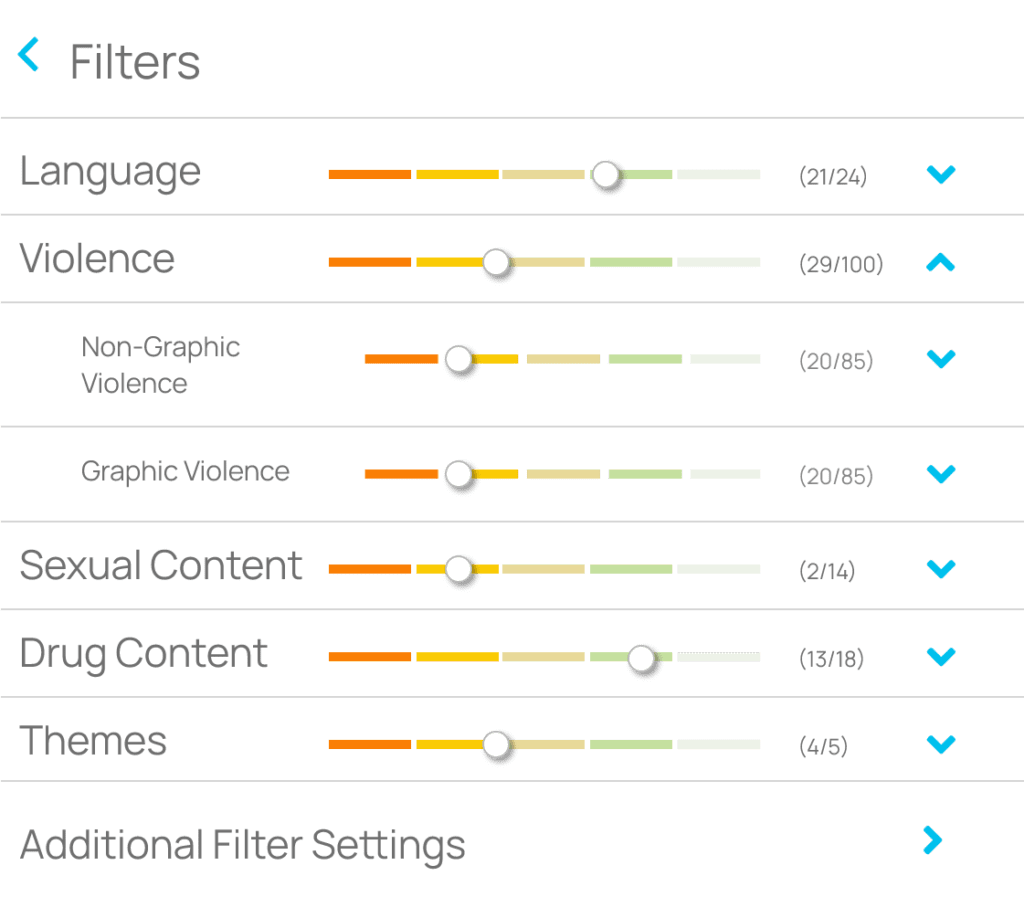
Our advanced profanity filtering system gives you granular control over what’s shown and heard across a growing library of select shows on Paramount+. You can filter by specific themes—profanity, violence, drug use, and sexual content—so you only block what matters to you. Rather than removing entire titles, our filtering technology cleans up the scenes, allowing you to enjoy the same great content, just without the parts you don’t want.
You can also adjust filters by content rating and age level, allowing you to scale sensitivity for different viewers in your household. Go even further with settings that control scene intensity, specific moments, or scene duration, giving you total freedom to tailor content to your family’s comfort zone.
Whether you’re streaming with your children or entertaining guests, Enjoy’s advanced content filtering lets you watch confidently—no awkward moments, no uncomfortable conversations, just clean and safe family-friendly versions of your favorite movies and shows.
Take control of your watching experience today.
Experience Bonus Features in our FREE 7-Day Trial
At Enjoy Movies Your Way, we’re not just about profanity filtering—we’re about transforming your entire streaming experience. In addition to our advanced profanity filter for Paramount+, we offer exclusive bonus features that give you even more control over how you and your family enjoy content across major platforms.
Playback Speed Control – Watch at Your Pace
Unlike Paramount+, which doesn’t offer playback speed options, Enjoy puts you in control. Whether you want to speed through slow scenes or slow down for clarity, our playback speed control feature allows you to customize the pace of your content in real-time.
Tag Mode – Personalized Content Filtering
Create custom filters tailored to individual needs and sensitivities. Whether it’s filtering out scenes for a loved one recovering from an eating disorder or skipping loud, intense moments for a veteran family member, Tag Mode makes every show or movie more accessible and emotionally safe—without removing the content you care about.
Ad Skip Queue – Skip Commercials Instantly
Watching ad-supported content on Paramount+? Our Ad Skip feature lets you breeze past interruptions so you can jump right back into your movie or episode. No more waiting. No more distractions. Just seamless viewing.
And More!
We’re constantly adding new features to enhance your family-friendly viewing experience—all designed to work across popular streaming services, including Paramount+, Netflix, and more.
Try It All—Free for 7 Days
Experience the full power of profanity filtering, content moderation, and custom streaming features risk-free. With Enjoy Movies Your Way, you don’t have to block entire shows—just the parts that don’t align with your values.
Ready to watch Paramount+ on your terms? Sign up today for your FREE 7-day trial and make every movie and show truly yours.





Join Thousands of Satisfied Users
Related Articles

How to Adjust Paramount Plus Playback Speed for Faster or Slower Viewing
Many streamers are happy with their Paramount Plus subscriptions—until they wish to speed up or slow down certain scenes. At Enjoy Movies Your Way, we

How to Turn On Paramount Plus Subtitles and Captions
How to Turn On Closed Captions on Paramount Plus Across Devices Closed captioning offers flexible and inclusive viewing when you’re watching an international film or