
Filter App for Amazon Fire TVs
Enjoy a Free Profanity Filter for Amazon Fire TVs
Enjoy Movies Your Way offers a free profanity filter for Amazon Fire TVs that mutes swear words or skips explicit scenes without requiring the full video to be restricted.
Viewers with families often want to avoid mature content, such as profanity, foul language, and violence, from their favorite streaming services. While many platforms offer basic rating filters or parental locks, these tools can be overly restrictive, blocking access to entire shows or movies for just a few explicit scenes.
With Enjoy Movies Your Way, you can have your cake and eat it too.
How to Install the Profanity Filter for Amazon Fire TV Devices
By downloading the Enjoy Movies Your Way TV app, you can connect powerful profanity filters to your streaming services for a fully customizable, family-friendly experience on your Amazon Fire TV or Fire TV Stick. Here’s how to get started:
- Open the Amazon App Store on your Amazon TV.
- Tap the Search bar at the bottom of the screen.
- Type “Enjoy Movies Your Way” and select the app from the results.
- Tap Install to download the app to your device.
- Once the download reaches 100%, tap Open to launch the app and begin filtering swear words, mature content, and more.
How to Connect Your Streaming Platform to Enjoy Movies Your Way
Once you’ve signed up for a free subscription to Enjoy Movies Your Way, you’re ready to connect your favorite streaming services and start creating a truly family-friendly experience. Here’s how to get started:
- Open the Enjoy Movies Your Way app on your Amazon Fire TV.
- Sign in using your account credentials.
- Navigate to the upper right corner and click the User Account icon (or select the center icon).
- Choose Streaming Accounts from the menu.
- Select the streaming platform you want to link to your Enjoy app, such as Netflix, Hulu, or others.
- You’ll be redirected to the Connect Streaming Accounts page.
- Follow the on-screen prompts to finish connecting your streaming account to your Enjoy Movies Your Way TV app.
Once connected, you’ll be able to apply your desired filters, mute offensive language, and skip mature scenes with ease, right from your Fire TV.
Compatible Streaming Services
Your Enjoy Movies Your Way app works seamlessly across all your favorite streaming subscriptions on Amazon Fire TV, giving you access to family-friendly content on platforms like Netflix, Hulu, and more, without limiting what you can watch.
| Streaming Service | Enjoy | ClearPlay | VidAngel |
|---|---|---|---|
| Netflix | ✅ | ✅ | ✅ |
| Prime Video | ✅ | ✅ | ✅ |
| Disney | ✅ | ✅ | ❌ |
| Max | ✅ | ✅ | ❌ |
| Apple TV+ | ✅ | ✅ | ✅ |
| Hulu | ✅ | ❌ | ❌ |
| Youtube | ✅ | ❌ | ❌ |
| Peacock | ✅ | ❌ | ✅ |
| Paramount Plus | ✅ | ❌ | ✅ |
| Amazon add-on channels | ✅ | Select channels | Select channels |
How to Access Filter Settings in Your Enjoy Movies Your Way App
Setting up your profanity filter on Amazon Fire TV is quick and easy. With Enjoy Movies Your Way, you have two flexible filtering options to fit your family’s unique needs:
- Filter in real-time: Instantly mute profanity, skip mature scenes, or adjust content filtering while watching your current movie or show on your Fire TV.
- Create a personalized filter profile: Set up a custom filter menu with your preferred settings, perfect for tailoring the experience across different family members or age groups.
Whether you want quick adjustments or long-term content moderation, Enjoy puts complete control in your hands with user-friendly filter settings designed for any household.

Profanity Filters Included in Enjoy Movies Your Way
With Enjoy Movies Your Way, you can filter shows and movies by type of mature themes, TV ratings, levels of intensity, and even down to the detail of filter duration for each scene, giving you control over your own streaming experience.
| Filter Type | Enjoy | ClearPlay | VidAngel |
|---|---|---|---|
| Language | ✅ (Automatic for all shows) | ✅ | ✅ |
| Violence | ✅ | ✅ | ✅ |
| Sexual Content | ✅ | ✅ | ✅ |
| Drug Content | ✅ | ✅ | ✅ |
| Themes | ✅ | ✅ | ✅ |
| Additional Settings | ✅ (More customizable settings) | ❌ | ❌ |
Tag Mode: Custom Filtering for Amazon Fire TVs
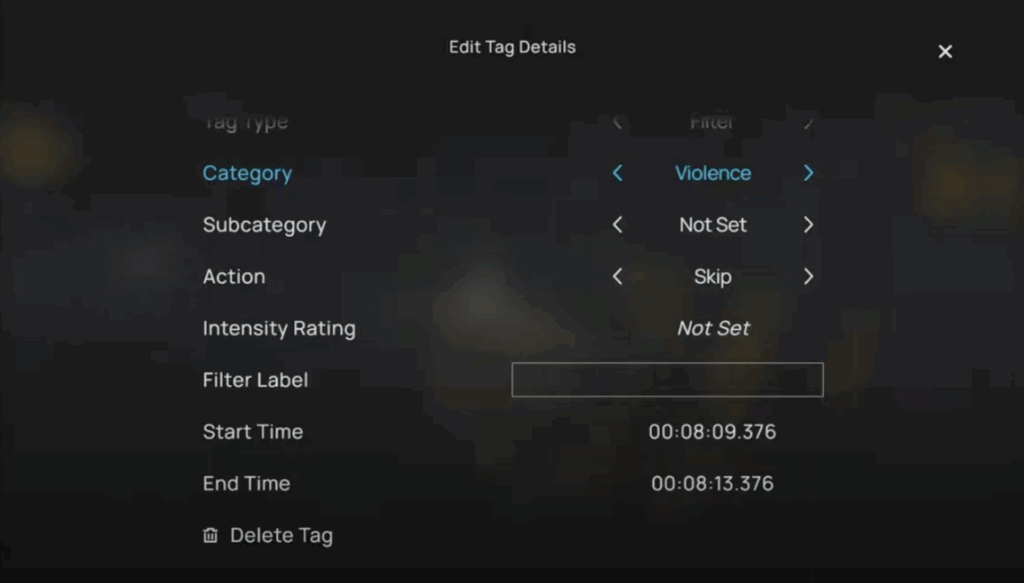
Enjoy Movies Your Way is the only profanity filter for Amazon Fire TV that allows you to create your own custom filters for scenes not typically flagged, such as medical trauma, abuse, or other emotional triggers. Perfect for families with unique sensitivities, our Tag Mode gives you full content control beyond age ratings or genre tags.
More Features to Enhance Your Viewing Experience
Beyond profanity filtering, Enjoy Movies Your Way also includes advanced tools that your regular streaming services may not provide, giving you total control over your viewing experience.
Ad Skip Queue
Automatically skip ads on streaming platforms for uninterrupted streaming without breaking immersion.
Playback Speed Control
Whether you want to speed up shows on Amazon Fire TVs to get to the best part or slow down scenes for better comprehension, this feature gives you complete control over playback speed.
Custom Stream Time Remaining
Only have a limited time to finish the show you’re watching? Our Custom Stream Time Remaining feature allows you to auto-adjust playback speed to help you finish your show before your next commitment.
All-in-One Discovery Hub
Enjoy Movies Your Way aggregates all your streaming subscriptions, such as Netflix and Hulu, into a single TV app, allowing you to browse and play content from one central location.
Subtitle Translations
Supporting over 120 languages, our cloud-based subtitle translator allows multilingual users or language learners to watch shows and movies in their preferred language.
Tailored for your Fire TV
Enjoy Movies Your Way is compatible with Amazon Fire TVs, Fire TV Sticks, and compatible smart TVs, with no additional hardware required.
* Ad-tier subscriptions in Netflix and Disney+ are not included.
What Does the Enjoy Community Say About Our Profanity Filters?
Our community of subscribers use our app to remain true to their Christian values and be safe from harmful content. Here’s their experience subscribing to us.
Sign Up Today and Take Control of What You Watch
Get started with a free monthly subscription that includes access to all profanity filters and customization tools. Simply download the Enjoy Movies Your Way app from your Amazon Fire TV or Fire TV Stick’s app store and start filtering in minutes.