






Pluto TV Profanity Filter for Cleaner, Family‑Friendly Streaming
Does Pluto TV Have a Profanity Filter?
Pluto TV does not include a native profanity filter that allows users to block or mute offensive language or scenes. The platform streams a mix of uncensored movies (such as Pulp Fiction) and TV versions with embedded muted profanity.
This means that if you want to watch a show that may include a moment or two that is mature, it may or may not be safe for your kids to watch. There is also no way for Pluto TV viewers to automatically hide or filter offensive language in captions.
The only way users can gain greater control over the content they watch is through built-in parental controls, such as Kids Mode. However, they can only block shows with offensive language. Your children can still be exposed to adult scenes, especially if you’re not there to supervise them.
A Parent's Guide to Filtering Content on Pluto TV
If you’re reading this, you’re probably a concerned parent. You’re probably worried about your kids getting exposed to violent or crass content in shows and movies before they’re ready for the talk. If you’re a subscriber to Pluto TV, you have a diverse library to choose from, but that also means hundreds of thousands of content that may not be family-friendly.
Here’s how you can filter profane language, violence, and other mature themes from your subscription.
Kids Mode
Pluto TV’s Kids Mode limits viewing access to Kids channel categories only. It blocks adult-oriented content from appearing on the profile. Here’s how you can access it from your profile:
To Turn Kids Mode ON
- Tap on the profile icon
- Tap on the Kids Mode
- Tap the Turn on Kids Mode
- The Kids Mode screen will load, and you will see the Pluto TV Kids logo and a different profile icon.
To turn Kids Mode OFF
- Tap the Kids Mode logo in the top right corner
- Tap Exit Kids Mode
The downside of Kids Mode is that you cannot fine-tune your library by age range. You can’t manually select or filter specific movies or channels either. It doesn’t offer options to mute profanity or hide captions with offensive language. When it comes to a more personalized, adjustable filter, Kids Mode falls short.
Hide Channels
Viewers with a Pluto TV account can manually hide channels. With this feature, you can hide specific channels that frequently stream mature content with profanity. If you have an account, here’s how you can access it:
- Go to My Pluto (icon or link at the bottom of the screen).
- Click the Edit section.
- Use the Eye icon to hide a channel you don’t want to appear.
- Use the Heart icon to mark favorite channels.
This feature is a manual process. While it may keep the streaming family-friendly when the children are around, you still have to go through the process of unhiding the channels when you want to watch your favorite show.
But what if you could automatically detect and filter profanity on Pluto TV, and not entire shows, movies, or channels?
Stream Pluto TV with a Profanity Filter App
Pluto TV’s parental controls and hide channel feature are limited to removing entire shows, movies, or channels. This can lead to losing access to family-appropriate content that may contain a few moments of coarse language.
But what if you can just mute or skip specific scenes instead?
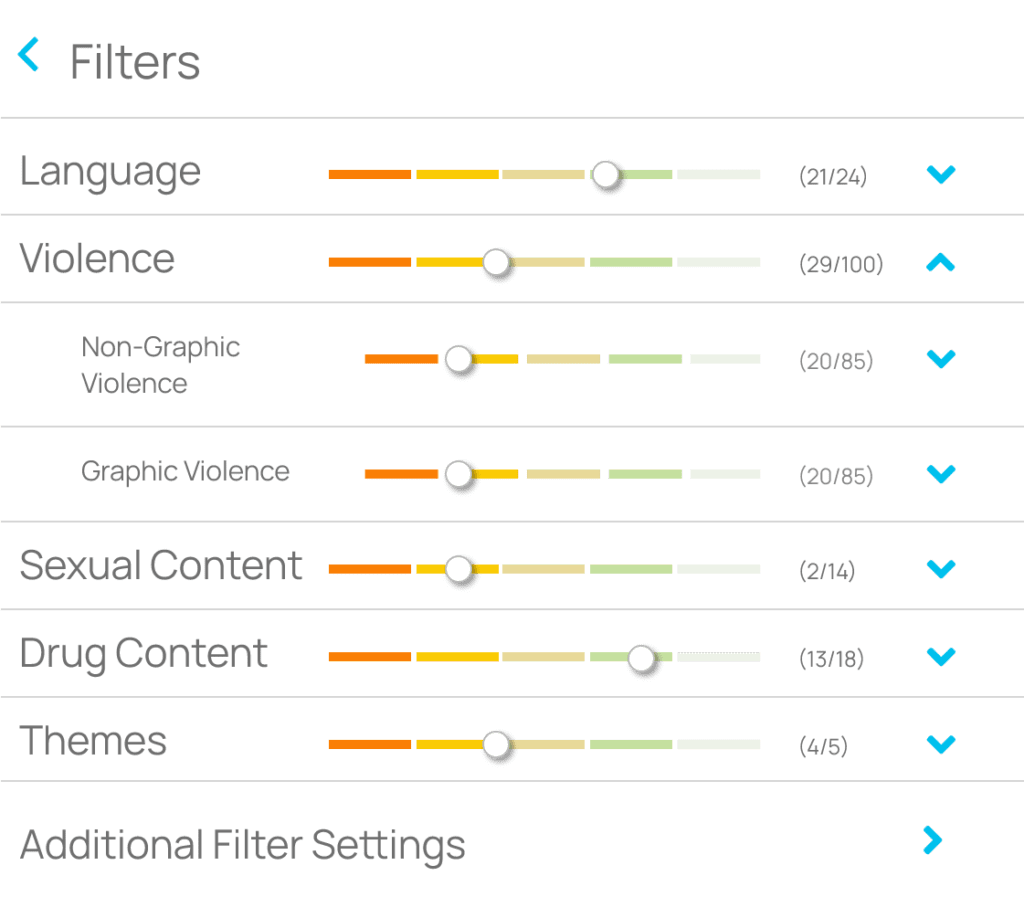
That’s where Enjoy Movies Your Way comes in. This advanced profanity filter app lets you automatically detect and filter out profanity, violence, drug use, sexual themes, and other unwanted content.
Unlike Pluto’s rigid tools, Enjoy gives you scene-by-scene control, allowing you to tailor your family’s streaming experience by the following:
- Themes
- Content rating
- Age level
- Scene duration
- Intensity level
This allows you to enjoy the same shows and movies, but with the unwanted parts filtered out, not locked away.
With your Pluto TV profanity filter app, you can filter captions, mute insulting language, and skip unwanted scenes. With this app, you have complete control over your viewing experience.
Create Your Own Filters with Tag Mode
Enjoy Movies Your Way is the only profanity app with a Tag Mode. This feature allows you to create custom filters based on your household’s specific needs, sensitivities, or preferences.
For instance, if you have a loved one with PTSD, they may feel grateful for skipping loud or intense scenes, allowing them to safely enjoy a show.
Instead of blanket restrictions, you can fine-tune which moments to skip, mute, or hide—scene by scene.
You don’t have to give up watching a show you love. You can keep the content you care about and remove only what you don’t want. With Tag Mode, you have selective control over how you experience media across streaming services like Pluto TV.
Elevate Your Streaming Experience With Extra Features
Enjoy Movies Your Way is more than just a profanity filter. It enhances your entire streaming experience, not just the audio or caption content. Designed for flexibility, accessibility, and personal control, Enjoy goes beyond what Pluto TV currently offers. The features below are designed with diverse watch habits, schedules, and needs in mind, from busy parents to students and language learners.
Add Playback Speed
While Pluto TV doesn’t offer a built-in playback speed control tool, Enjoy allows you to speed up to skip fillers or slow down for better comprehension.
Ad Skip Queue
If you’re using free or ad-supported plans across streaming services, Enjoy’s Ad Skip Queue* helps you bypass ads without disrupting your viewing experience.
Custom Stream Time Remaining
Got 30 minutes left before bed, but 40 minutes left in the movie? This Pluto TV profanity filter app automatically adjusts playback speed to fit your available time.
Beyond Pluto TV: Enjoy Filters Shows and Movies for Major Streaming Services
Your profanity filters and streaming-enhancing features don’t just work with Pluto TV. They also enhance your viewing across other streaming services. Simply link your Pluto TV and other streaming services accounts to the Enjoy platform or browser extension, and you’re ready to watch smarter.
Sign Up for a Free Account for Pluto TV Profanity Filter
Start using Enjoy Movies Your Way without commitment. Simply sign up for a free account and explore the features of our Pluto TV profanity filter app. Make streaming safer, more enjoyable, and more accessible for everyone in the home.
Join Thousands of Satisfied Users
Related Articles

Playback Speed Control for Hulu: How to Adjust Video Playback Speed
Can You Control Video Playback Speed Directly on Hulu For now, Hulu does not offer built-in playback speed control options. Unlike popular platforms like Netflix

How to Get Rid of Ads on Hulu Without a Premium Account
More streaming platforms have been moving towards tiered membership, inflicting users with ads even with a paid subscription. Rumbles of it first started years ago

Does VidAngel Work With Hulu?
VidAngel is one of the better-known content filtering services that families use to help ensure movies and TV shows are appropriate for their children. With